The most underused feature on LinkedIn is quietly costing you money
You spent years building your LinkedIn presence. You share insights, grow your network, build credibility in your field. People notice. They visit your profile, read your experience, and decide they want to talk to you.
Then they send you a message. And nothing happens.
Not because you don't want to respond. But because LinkedIn inboxes are chaotic, life is busy, and a message from three days ago feels impossible to address by the time you see it. The moment and the person is gone.
This is the silent problem of every expert, consultant, founder, and advisor with an active LinkedIn presence. You are generating genuine demand for your knowledge every single day. But without a system to capture it, that demand dissipates into an unread inbox.
LinkedIn has already built the solution. It has existed for years. Barely anyone uses it correctly.
What is LinkedIn's Away Message and why does everyone misuse it?
LinkedIn Premium includes a feature called the Away Message. It works exactly like an out-of-office email reply: the moment someone sends you a message, they instantly receive a pre-written response from you automatically, with no action required on your part.
Most people discover it before a vacation. They write something like "I'm out of office until the 20th, back soon." They return from holiday, forget the feature exists, and never think about it again.
That framing "I'm away" is the reason this tool stays buried. It sounds like a passive notification. A polite apology for being absent.
But flip the framing entirely and you see what it actually is: a 24/7 automatic redirect for every person in your network who already wants to talk to you.
Not a bot. Not a third-party automation tool. A native LinkedIn feature, built by LinkedIn, trusted by LinkedIn, available inside your existing Premium account right now.
The reframe that changes everything
Your LinkedIn Away Message is not an absence notice. It's the front door of your expertise business.
When someone messages you on LinkedIn, they are not a cold lead. They have seen your content, read your profile, or been referred to you by someone who knows you. They have decided, on their own, that you are the person they want to speak to. That is one of the warmest forms of inbound that exists in professional networking.
The traditional path after that moment is:
Message sent → sits in inbox → seen days later → awkward late reply → momentum lost → conversation never happens.
The new path, with your Away Message pointing to your Tinrate link, looks like this:
message sent → instant auto-reply with your booking link → they book a session → you have a paid, structured conversation with zero back-and-forth.
The value you have built on LinkedIn, your followers, your content, your reputation, finally has a destination.
How Gunther Ghysels uses it to handle 30+ daily messages without reading a single one
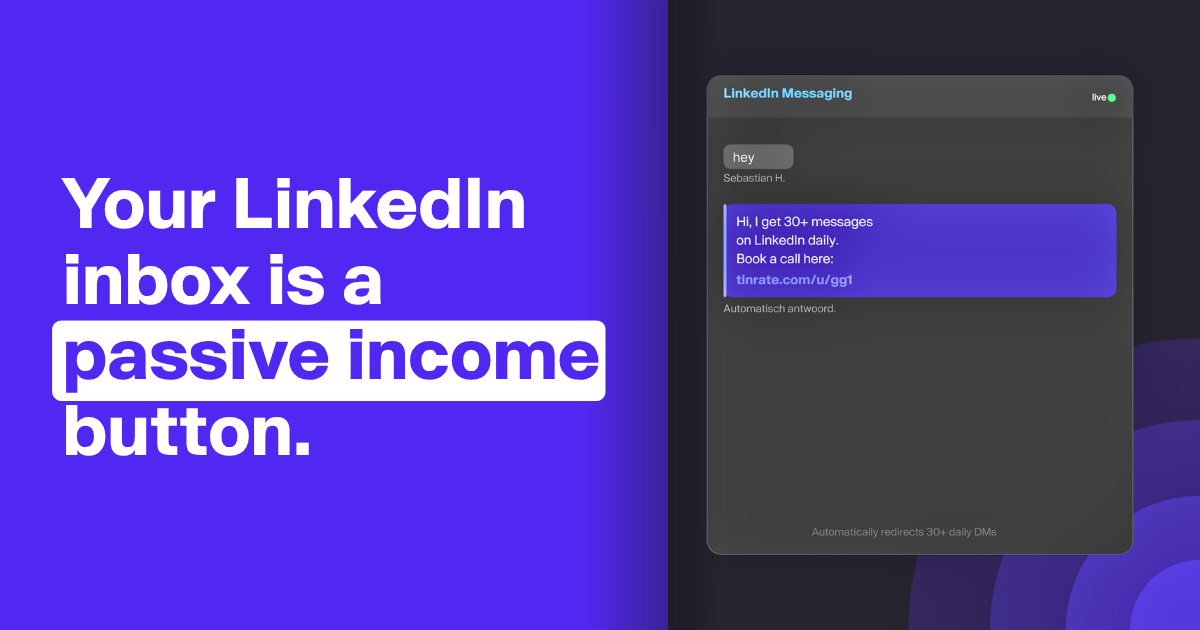
Gunther Ghysels, founder of Tinrate, is active enough on LinkedIn that his inbox receives upwards of 30 messages a day. Responding to each individually would consume hours. Ignoring them would waste some of the highest-quality inbound a professional can receive.
His Away Message handles every single one:
"Hi, I get 30+ messages on LinkedIn daily which is very time-consuming. If you want to talk, you can easily book a slot at tinrate.com/u/gg1 Thanks"
He wrote those three sentences once. Every person who messages him, a potential client, a collaborator, a founder looking for advice, a journalist, receives that reply instantly. No delay. No follow-up required. No conversation thread that drags on for a week before anyone commits to actually talking.
The ones who are genuinely interested book a session. The ones who were sending casual messages self-select out. The result is a calendar that fills with high-intent conversations, driven entirely by the network he already has, requiring almost nothing from him on a daily basis.
Why this works: the three forces behind the Away Message trick
Force 1: Speed creates conversion.
Research consistently shows that the faster a response arrives, the more likely the interaction converts into something meaningful. An Away Message responds in seconds, faster than any human could. The person who messaged you is still in the mindset of "I want to talk to this person" when they see your reply and your booking link. That immediacy dramatically increases the likelihood they actually book.
Force 2: Redirection beats explanation.
When you reply to a DM manually, you have to context-switch, remember what they asked, craft a response, and then somehow steer the conversation toward a real meeting. With a booking link in your auto-reply, all of that disappears. There is one clear next step. The friction is gone. People who are interested will click. People who were not serious will not. Which is a filter, not a loss.
Force 3: Scale without effort.
Your Away Message does not care how many people message you. Whether it is three messages a day or three hundred, every single one gets the same instant, professional, link-bearing reply. The system does not get tired. It does not forget. It does not have bad days. Once set, it is working for you across every time zone, every hour, every day until you update the date, which takes approximately thirty seconds.
Who should be using this right now
This trick is not only for people with huge audiences or high-volume inboxes. It is for anyone whose LinkedIn connections represent genuine professional value.
Consultants and freelancers who rely on referrals and inbound: every person who messages you is a potential client. Give them a direct path to your calendar.
Founders and operators who are regularly asked for advice: your time is finite and valuable. A booking link communicates that without being dismissive.
Academics, researchers, and subject-matter experts who receive requests for their insights: your expertise has a market rate. Make it accessible without giving it away in an endless DM thread.
Anyone who has ever helped someone for free over LinkedIn and then watched them implement that advice without ever paying for your time: this is how you stop that pattern without a single awkward conversation.
If people are messaging you on LinkedIn because of what you know, you already have the demand. You are just missing the infrastructure to capture it.
How to set up your LinkedIn Away Message in under 2 minutes
This feature requires LinkedIn Premium. If you are an expert monetising your knowledge, a Premium subscription is already worthwhile for the visibility and networking tools alone. This use case adds a new dimension to that investment.
Step 1. Open LinkedIn and navigate to your messaging inbox.
Step 2. Click the "···" (More) icon in the top-right corner of the messaging window.
Step 3. Select "Set away message" from the dropdown menu.
Step 4. Toggle the switch to ON.
Step 5. Set your start and end dates. Use a 90-day window. Put a quarterly reminder in your calendar to refresh it. That is 4 updates per year, roughly 2 minutes of total maintenance.
Step 6. Write your message. See the templates below.
Step 7. Click Save.
Your LinkedIn inbox is now an automatic booking funnel. Every message your network sends you triggers an instant, professional reply with a direct path to your Tinrate profile.
Three Away Message templates you can copy today
Template 1: Direct and high-volume: "Hi, I receive a lot of messages on LinkedIn and can't always respond in time. The best way to actually talk is to book a session with me directly: [your Tinrate link]. Looking forward to it."
Template 2: Value-forward: "Thanks for reaching out. If you're looking for [your area of expertise], I offer 1:1 sessions where I give you my full, focused attention. Book directly here and let's make it count: [your Tinrate link]"
Template 3: Personal and honest (Gunther's approach): "Hi, I get [X]+ messages on LinkedIn daily which makes it hard to give everyone the response they deserve. If you want to have a real conversation, you can book a slot here: [your Tinrate link]. Thanks"
Keep the message short. One or two sentences acknowledging the volume, one sentence with the link, one closing line. That is all it needs.
What to keep in mind
Away Messages only go to your direct connections, not to group chats. This means the people receiving your auto-reply already know who you are, they are warm contacts, not cold outreach. Your booking link lands in front of exactly the right audience.
The feature requires a date range. LinkedIn's Away Message is not designed to run permanently, it needs a start and end date. Setting it in 90-day windows with a quarterly refresh keeps it active year-round with minimal effort. Four updates a year, two minutes each.
Tone matters. The Away Message is not a wall, it is a redirect. Write it with the same warmth you would bring to a real reply. You are not dismissing the person. You are giving them the most efficient possible path to a real conversation with you.
→ Create your free Tinrate profile at tinrate.com and add your link to your LinkedIn Away Message today.
Frequently Asked Questions
What is LinkedIn's Away Message? LinkedIn's Away Message is an automatic reply feature available to LinkedIn Premium users. When activated, it sends a pre-written message to any connection who DMs you during a set date range, similar to an out-of-office email reply, but for LinkedIn messaging.
Can I use LinkedIn's Away Message to share my booking link? Yes. Many professionals use the Away Message to redirect incoming DMs to a scheduling or booking page. Including a Tinrate link means anyone who contacts you is automatically directed to book a paid or free session — instantly, without any manual effort.
Is LinkedIn's Away Message a free feature? No. The Away Message is a LinkedIn Premium feature. It requires an active Premium subscription to activate.
How often do I need to update my LinkedIn Away Message? LinkedIn requires a start and end date for the Away Message. Setting it in 90-day windows and refreshing it quarterly, approximately 3 to 4 times per year, keeps it active year-round with minimal maintenance.
Who receives my LinkedIn Away Message? Your Away Message is sent to your direct LinkedIn connections who message you. It does not appear in group chats. This means it reaches warm contacts, people who already know you, making it especially effective for booking link redirects.
What should I write in my LinkedIn Away Message to get bookings? Keep it honest and direct. Acknowledge that your inbox is busy, tell them the best way to reach you, and include your Tinrate booking link. Two to three sentences is ideal. Avoid anything that sounds like a sales pitch, the goal is to give them a clear, frictionless path to a real conversation.
Can I use this strategy even if I don't have a large LinkedIn following? Absolutely. This works for anyone whose LinkedIn connections represent professional value, consultants, founders, researchers, advisors, freelancers. You do not need thousands of followers. You need people who already trust you and occasionally want to talk to you. Most active professionals have that audience already.